
When you’re working with large datasets, you’ve probably run into performance issues caused by inefficient joins. It’s something I’ve run into plenty, but here are a few things that have helped improved query performance.
Why Joins Can Slow You Down
In larger tables, like Posts and Users tables in StackOverflow, inefficient joins can cause SQL Server to process far more data than necessary, leading to long wait times and wasted resources. However, with the right optimizations, you can cut those times down.
3 Simple Tips to Speed Up Joins
- Index the Right Columns
One of the easiest ways to improve join performance is by adding indexes to the columns used in your join condition. For example, if you’re joining on Posts.OwnerUserId and Users.Id, indexing both of these columns can help SQL Server perform an index seek/scan rather than a slower table scan. Luckily, these are the “PK” columns for this example so they should already be indexed with the clustered index.
Example query without indexes:
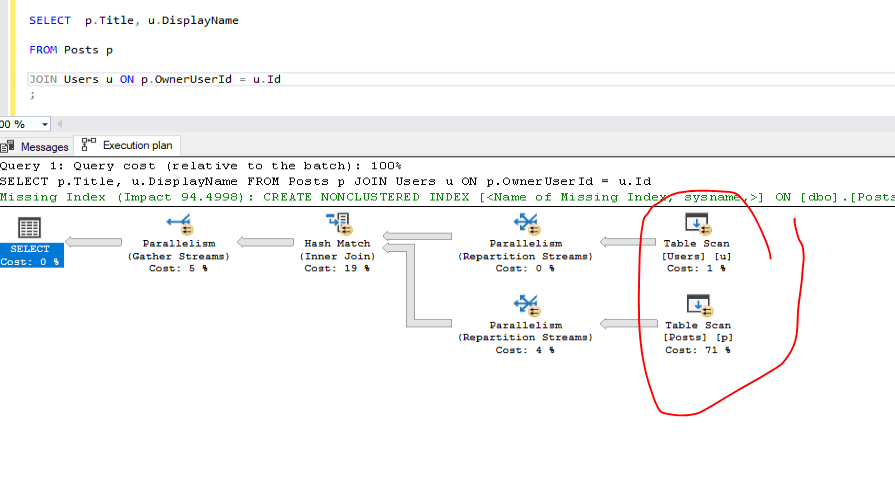
This query may cause a full table scan if no indexes are present, which is inefficient when dealing with millions of rows. To improve performance, you should index the columns involved in the join. Or in this case create clustered indexes for the tables:
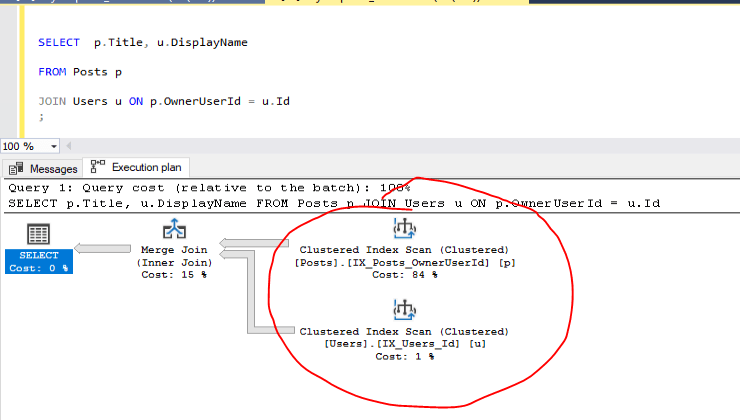
Now, SQL Server can use the indexes to perform an index seek, drastically reducing the time it takes to retrieve results.
- Choose the Right Join Order
The order of tables in aJOINcan impact performance. SQL Server processes the table on the left side first, so putting the smaller or more filtered table on the left can speed things up. For example, if you’re joiningPostsandUsers, andUsersis a smaller or more filtered table, start with it. This way, SQL Server processes fewer rows.
Here’s a query with the smaller table first:

Here is an example of it with the larger table first:

These are small queries returning 10K rows, so the difference isn’t huge, but scale that up, and bada boom—you’re really making some progress.
- Filter Early
My favorite trick is applying filters early to reduce the size of the dataset before the join. If you know you only need certain rows, filter them before you join. This can greatly reduce the amount of data SQL Server needs to process. A lot easier finding your car in an empty parking lot, after all.
Example query without early filtering:
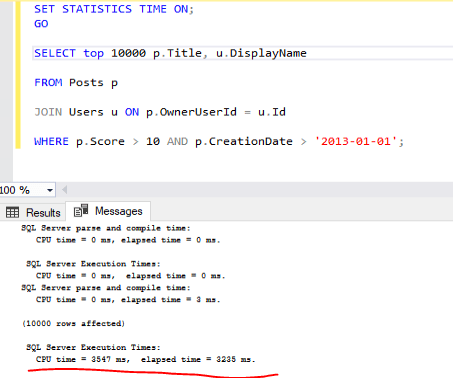
A better approach is to filter Posts before the join, which reduces the number of rows that need to be processed:
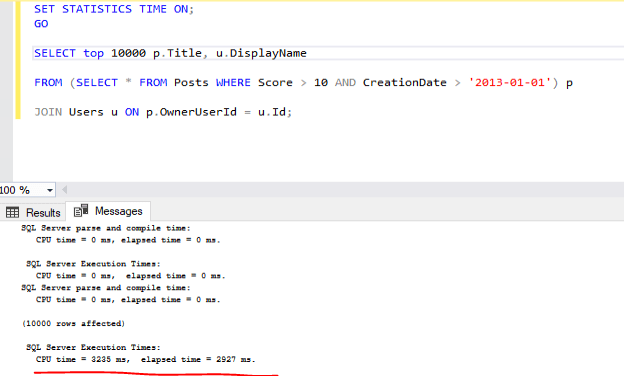
By limiting the number of rows in Posts before the join, SQL Server can complete the operation more efficiently. Although this example definitely isn’t something to write home about…
Final Thoughts
Whether you’re working with a large dataset in production or something like the Stack Overflow database, indexing, selecting the right join order, and applying filters early can make a big difference in query performance. Try these simple adjustments, and you’ll likely notice your queries running much faster with far less overhead. Or at least look like you know what you are doing.
 MosherData
Leave a comment