

We all want to finish projects quickly, but ignoring small details can lead to technical debt that needs to be fixed later. In SQL Server, technical debt can slow down your system and make maintenance difficult. Here are some common issues and easy fixes to keep your database running smoothly.
Cross-Database Queries Try to avoid referencing one database from another unless absolutely necessary. It can lead to maintenance headaches and slow performance. Keep your databases separate.
Example:
SELECT a.Name, b.OrderDate
FROM DatabaseA.dbo.Customers a
JOIN DatabaseB.dbo.Orders b ON a.CustomerID = b.CustomerID;
Problems:
- Maintenance Issues: Harder to manage and update databases.
- Performance Hits: Queries can slow down due to increased complexity.
Case Sensitivity Be consistent with how you write SQL Server objects and column names. For instance, always use CustomerID instead of sometimes using customerID. This prevents errors and confusion.
Example:
SELECT CustomerID FROM Customers; -- Consistent
SELECT customerID FROM Customers; -- Inconsistent
Problems:
- Query Failures: Case mismatches can cause query failures in case-sensitive databases.
- Confusion: Inconsistent casing makes the code harder to read and maintain.
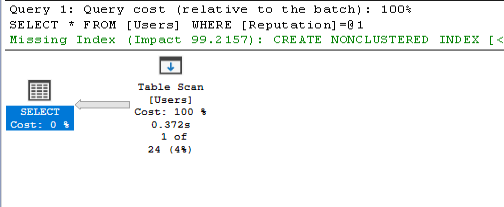
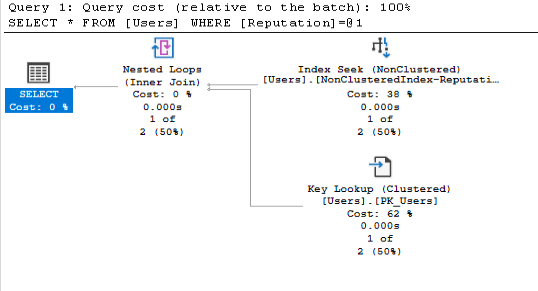
Missing Indexes Indexes help the database find information quickly. Missing the right indexes can slow down your queries. Regularly check and add necessary indexes to speed up queries.
Example:
— Without Clustered Index
SELECT * FROM Users WHERE Reputation = 10000;
— With Indexes
SELECT * FROM Users WHERE Reputation = 10000;
Problems:
- Slow Queries: Without indexes, the database takes longer to find rows.
- Performance Bottlenecks: Can significantly degrade overall database performance.
Inefficient Queries Poorly written queries can slow down performance. For example, avoid using SELECT * and list the columns you need.
Example:
SELECT * FROM Users; — Inefficient
SELECT ID, CreationDate, AccountIDFROM Users; — Efficient
Problems:
- Slow Performance: Retrieving unnecessary columns uses more resources.
- Increased Load: More data transferred than needed, impacting performance.
Outdated SQL Server Versions Using old versions can expose your system to security risks and compatibility issues. Keep your SQL Server updated to the latest version for the newest features and security patches. However, note that some older applications may require specific compatibility levels to function correctly.
Example:
— Check SQL Server version
SELECT @@VERSION;

Problems:
- Security/Performance Risks: Older versions may have unpatched vulnerabilities (let alone newer performance features)
- Compatibility Issues: Newer applications might not work properly with outdated versions. Some older applications need older compatibility levels to function correctly.
 MosherData
Leave a comment